What Is the Maximum Ethernet Cable Length and Why Does It Matter
What Is the Maximum Ethernet Cable Length and Why Does It Matter
The maximum ethernet cable length for most categories is 100 meters (328 feet). If you use cables longer than this, you risk signal loss and slower network speeds. Stronger signals help you keep your data reliable and fast. Take a look at how cable types compare:
Cable Type
Maximum Length
1 Gbps Speed
10 Gbps Speed
Cat5e
100 meters
Yes
Up to 50 m
Cat6
100 meters
Yes
Up to 50 m
Cat6a
100 meters
Yes
Yes
Cat7
100 meters
Yes
Yes
When you choose the right cable length, you protect your network from weak signals and poor performance.
Key Takeaways
Most Ethernet cables can be up to 100 meters long. If the cable is longer, the signal can get weak. This can make your internet slower.
Picking the right cable is very important. Cat5e works well for homes. Cat6 and Cat6A are better for faster internet.
Longer cables can make the signal worse. Try to keep cables shorter than 100 meters. This helps your internet stay fast and steady.
Use shielded cables if there is a lot of noise nearby. This stops other signals from messing with your cable. It helps keep your connection strong.
If you need a cable longer than 100 meters, use an Ethernet extender. You can also use fiber optic cables. These help your internet stay fast and work well.
Maximum Ethernet Cable Length Explained
Standard Limits for Cat5e to Cat8
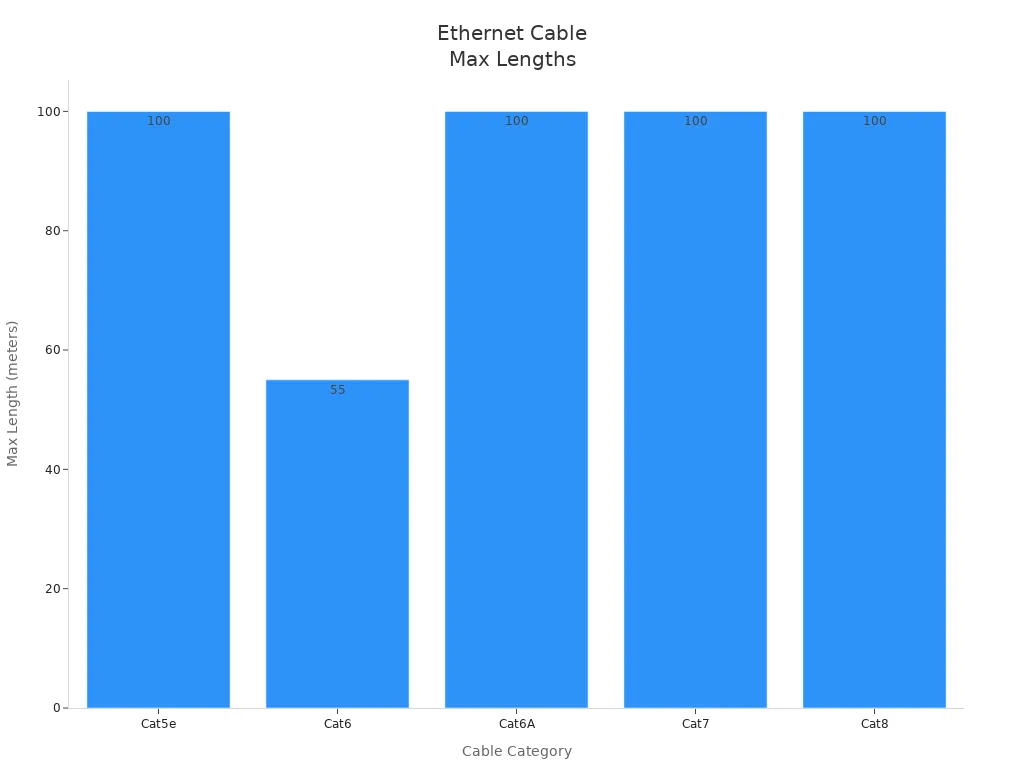
You need to know the maximum ethernet cable length for each cable type before you set up your network. Most ethernet cables, from Cat5e to Cat8, have a maximum length of 100 meters, or 328 feet. This limit helps you keep your network running smoothly and prevents problems with signal speed and quality.
Here is a table that shows the different categories and their distance limits, along with their speed and bandwidth:
Cable Category
Maximum Length
Speed
Bandwidth
Cat5e
100 meters
Up to 1Gbps
100 MHz
Cat6
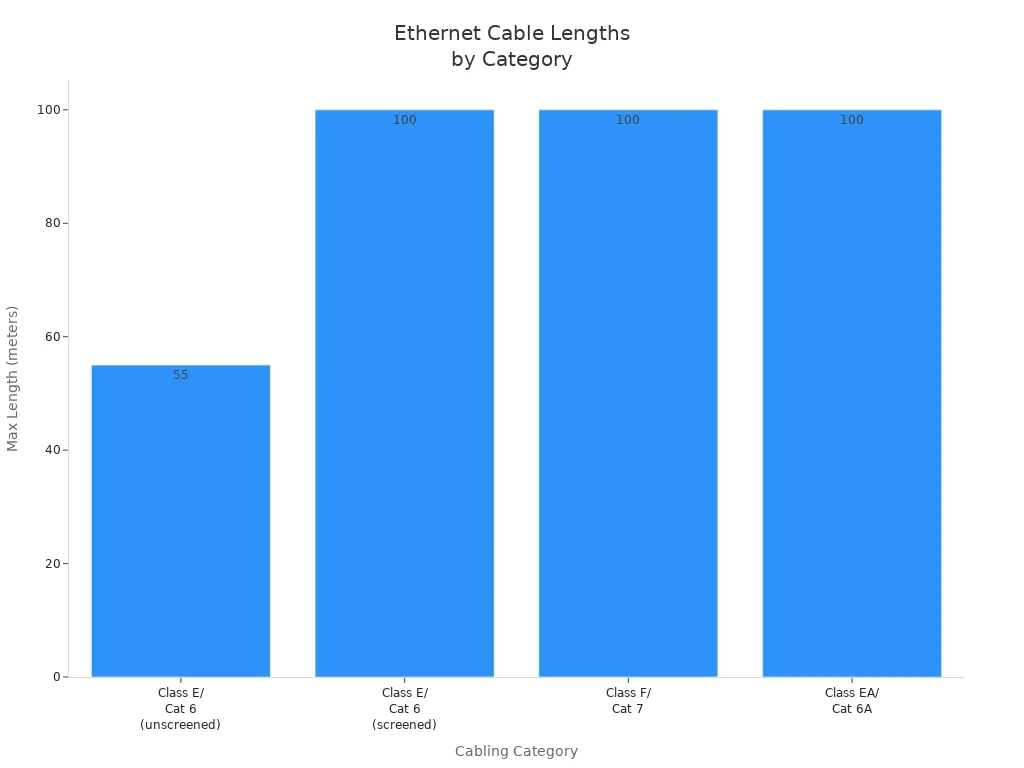
55 meters*
Up to 10Gbps
250 MHz
Cat6A
100 meters
Up to 10Gbps
500 MHz
Cat7
100 meters
Up to 10Gbps
600 MHz
Cat8
100 meters
Up to 25Gbps
2000 MHz
*Cat6 cables can reach up to 10Gbps, but only for a maximum effective length of 55 meters. For longer runs, you should use Cat6A or higher.
When you choose the right cable for your network, you make sure your ethernet cable length limits match your needs for speed and performance. Cat5e works well for most homes and small offices. Cat6 and Cat6A are better for faster connections or longer distances. Cat7 and Cat8 are best for high-speed, professional setups.
Why 100 Meters Is the Limit
You might wonder why the maximum ethernet cable length is set at 100 meters. International standards organizations, like ANSI/TIA and ISO/IEC, set this rule to make sure your network works well. These groups studied how ethernet cables carry signals over long distances. They found that after 100 meters, the signal gets weaker and can cause problems with performance.
Here are the main reasons for the 100-meter limit:
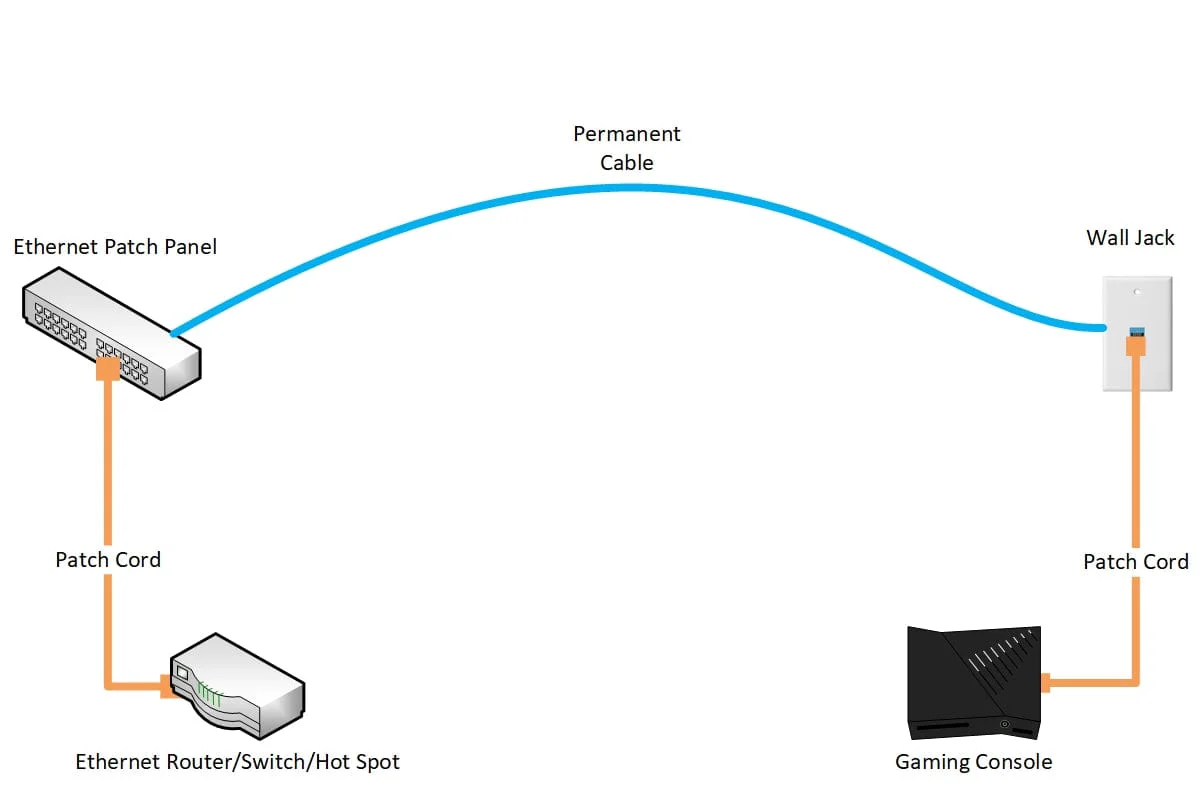
The 100-meter length includes a 90-meter horizontal cable run and two 5-meter patch cords at each end.
If you go past this distance, the signal can lose strength, which leads to slower speed and possible connection failures.
Note: The 100-meter rule helps you avoid signal loss, packet errors, and network delays. Following this limit keeps your network stable and fast.
When you plan your ethernet cable runs, always remember the maximum length. This simple rule protects your network from signal problems and keeps your devices connected at top performance.
How Ethernet Cable Length Affects Performance
Signal Loss and Degradation
When you use an Ethernet cable, the signal moves from one end to the other. If the cable is longer, the signal gets weaker. This is called attenuation. The longer the cable, the more the signal fades away. If the cable is too long, the signal may not reach the end clearly.
The 100-meter limit for a 4-connector channel uses a 90-meter main cable and two 5-meter patch cables. This rule is based on the worst-case performance for each use. About thirty years ago, experts made the first twisted-pair cabling rules. They learned that at the highest frequency and length, some things can stop the signal from reaching the end. Insertion loss, which means signal weakening, is a main problem. This loss happens in any cable, no matter the type. The longer the cable, the more signal you lose.
Electromagnetic interference can also hurt the signal. In places with lots of machines, like factories, motors and welders make electromagnetic noise. This noise can mess up the Ethernet signal, especially with long cables. If the cable goes through a magnetic field, it can pick up extra electric currents. These currents can make the signal unstable and cause problems. In important places, this can cause delays or even equipment to stop working.
The environment can also change how well cables work. High heat and humidity can damage cables over time. If you use a long cable in a hot or wet place, the cable may not work as well.
Impact on Speed and Reliability
If you use a cable that is too long, you will see problems with speed and reliability. The network might get slower, and you could lose your connection. Data may move slower, and you might see errors or lost packets. This happens because the signal gets weaker as the cable gets longer.
Using a cable that is too long can slow down data speeds.
Each Ethernet cable type has a set maximum length for best results.
For example, a Cat6 cable can send data at 1 Gbps for 100 meters, but if you go past this, the speed drops.
When the signal gets weaker as the cable gets longer, you can lose packets and have errors. This is why you should follow the 100-meter rule. If you use a cable longer than 100 meters, the signal can get so weak it is seen as noise, and you lose packets. The signal can only handle so many errors, and if the cable is too long, the signal gets much worse. As the cable gets longer than 100 meters, the signal gets weaker, speeds drop, and you lose more packets.
You should also know the main reasons Ethernet cables fail when they are too long or not installed right. Here is a table that shows these reasons:
Using more than 100 meters can make the signal weak and lower the connection quality.
Improper Termination
If cables are not ended right, you can lose the connection.
Poor Installation Practices
Tight ties or bad cable paths can hurt the cable and make it fail early.
If you want your network to be fast and stable, always use good cables and keep them under the maximum length. This helps you avoid signal problems and keeps your network working well. Longer cables make speed and reliability worse. The farther the signal has to go, the more likely you are to have network problems.
Testing your cables can help you find problems before they hurt your network. You can use tools like Ethernet port testers, PoE load testers, and link speed checkers to make sure your cables work right. These tools help you find issues and keep your network running well.
If you know what affects cable performance, you can make better choices for your network. Always plan your cables, use the right type for the distance, and test your setup to make sure you get good speed and signal.
Ethernet Cable Length Limits and Practical Solutions
Choosing the Ideal Ethernet Cable Length
Picking the right ethernet cable length is important for a strong network. You need to think about a few things before buying cables.
Cable category: Cat5e is good for simple jobs. Cat6 and Cat6a are better for faster speeds and longer distances.
Shielded or non-shielded: Use shielded cables if there is a lot of electrical noise around.
Length: Buy a cable that is a little longer than you need. This helps if you need to move things later.
Supplier: Look at different sellers to find the best price and product.
Solid or stranded: Solid cables are best for cables that do not move. Stranded cables are better if you need to bend them.
The place where you put your cables matters too. Sun, water, and heat can hurt cables. If cables are close to machines or power lines, the signal can get messed up. Pick cables that can handle these problems so your network stays strong.
Extending Ethernet Beyond 100 Meters
Sometimes you need your ethernet cable to go farther than 100 meters. You can use special tools to help the signal go longer distances.
Antaira’s LEP-301M-KIT: This tool lets copper cables go up to 1000 meters. It also works with Power over Ethernet.
Patton’s TKIT-ETH: This tool lets you use fiber lines for ethernet. It can reach up to 20 kilometers.
CopperLink CL2300E: This tool works with twisted-pair wires for long distances. It works even in tough places.
These tools help your signal stay strong over long distances. You can also use switches or repeaters to make your cable go farther. Always check how far your setup can go before you add more.
Best Practices for Installation
Good installation helps your ethernet cables work their best. Try these tips:
Practice
Why It Matters
Use shielded cables
Stops interference and keeps your signal strong for long cables
Avoid running near electrical sources
Stops signal loss from power lines or machines
Upgrade to fiber optic for long runs
Fiber cables are better than copper for very long distances
Route cables away from EMI sources
Keeps your network working well and stable
Leave space for future expansion
Makes it easy to add or change cables later
Avoid sharp bends and twists
Keeps cables safe and stops signal problems
Use high-quality tools for terminations
Makes sure your connections are strong and work well
Keeping your cables neat and labeled helps your network last longer. Check your cables often for damage. Store them in a safe and dry place. These steps help your network stay fast and work well.
If you keep your Ethernet cables under 100 meters, your network stays fast and reliable. Planning your setup helps stop weak signals and dropped connections. If you need your network to reach farther, look at your choices. The table below shows how each solution works for users and how well it performs:
Solution Type
Pros
Cons
Extended Twisted-Pair Solution
Simple design, works with PoE, uses RJ45, easy to fix, low cost
Not standard, needs more testing, has some limits
Adding TRs
N/A
Expensive, takes up space, can interrupt work
Using PoE Extenders
N/A
Harder to manage and fix, not good for strict rules
Extending Copper Infrastructure
Saves money, easy to use, managed in one place
Hard to check performance, not standard
Pick the best way for your network so it works well.
FAQ
How do you measure Ethernet cable length for your network?
You measure the cable from end to end, including patch cords. Use a tape measure or check the label on the cable. Always plan for a little extra length to avoid tight bends.
What happens if you use a cable longer than 100 meters?
You may see slower speeds, dropped connections, or data loss. The signal gets weaker as it travels farther. Your network will not work as well.
Can you use multiple shorter cables with connectors to reach farther?
You can connect cables with switches or repeaters. This helps the signal travel longer distances. Each device boosts the signal and keeps your network strong.
Do shielded cables help with longer runs?
Shielded cables block interference from electrical noise. You get better performance in busy areas. Shielding does not increase the maximum length, but it keeps your signal cleaner.
What is the best way to extend Ethernet beyond 100 meters?
You can use Ethernet extenders, switches, or fiber optic cables. Extenders and switches boost the signal. Fiber optic cables work best for very long distances.